



Model Builder Scale Conversions
Do you or members of your club or members of your family model in a lot of scales?
With Model Builder you can save a project in one scale and re-open it in any other scale!
Say you decide to design a building in 1:48 scale. OR someone shares a file with you that happens to be in 1:48 scale.

you can save it
and then open Model Builder in any other of your scales, say 1:160 and select "Enter"

Then, select "File" > "open" from the file menu drop down. Browse to the building you just made in 1:48 scale and choose "open".

Model Builder will prompt you "that building was made in a different scale....?" choose yes
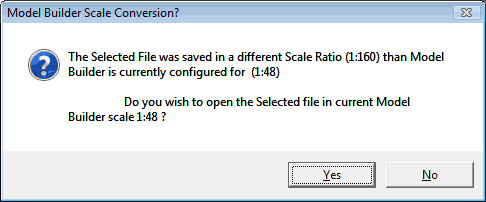
and your saved o scale building will now be open for you to use in n scale! That's It!
Note: It is usually best to make these changes in scale from big to smaller.
Since 1:160 has a lot more room on a single page, a building made in 1:160 could easily be more than 4 pages in 1:48.